Sales Call
Report Parameters
|
Field |
Description |
|---|---|
|
Report Name |
The name of the report. |
|
Detail |
Generates detailed sales call report. |
|
Summary |
Generates summarised sales call report. |
|
View By |
Available options include the following:
|
|
Start Date |
The start date from when the data must be considered for generating the report. |
|
End Date |
The end date until when the data must be considered for generating the report. |
|
Options |
Available options include the following:
|
|
Accounts |
Select desired accounts from the drop-down menu. This drop-down is displayed only when Accounts is selected in report options. |
|
Manager Type |
These options are displayed only when Managers is selected in report options for a Sales call detail. Whereas for Sales call summary, these options are displayed by default. Available options include the following:
Based on the selected option, the drop-down gets populated with respective manager names. Users can select multiple or all the available managers from the drop-down list. |
|
Call Types |
Select desired call type codes from the drop-down menu. This drop-down is displayed only when Call Types is selected in report options. |
|
Next Steps |
Select desired next step codes from the drop-down menu. This drop-down is displayed only when Next Steps is selected in report options. |
|
Sort By |
Available options include the following:
These options are displayed only for sales call summary. |
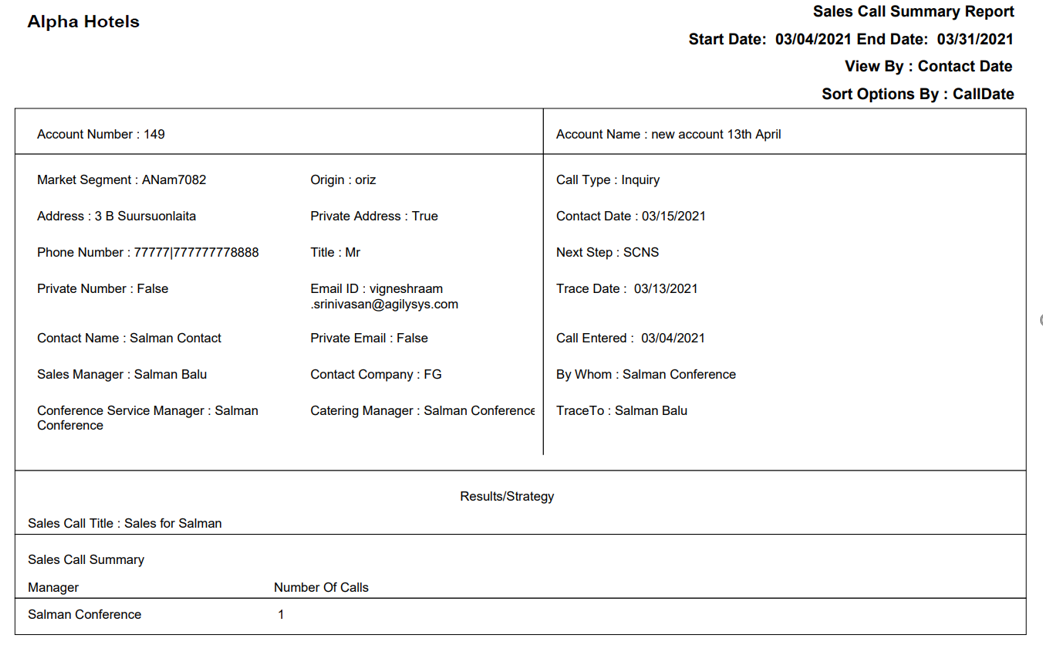
Sample Report - Sales Call Summary
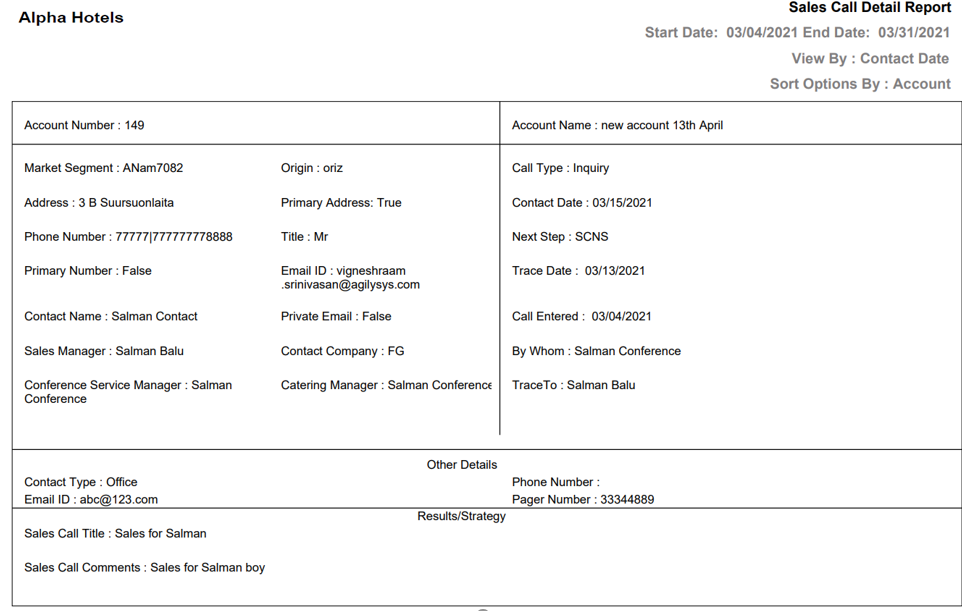
Sample Report - Sales Call Detail
Report Fields
|
Field |
Description |
|---|---|
|
Account Number |
The account number associated with the group. |
|
Account Name |
The name of the account associated with the group. |
|
Market Segment |
The market segment code that defines the type of business. |
|
Address |
The address of the booking contact. |
|
Private Address |
Indicates whether it is a private address. However, the title of this field in sales call detail report is Primary Address. |
|
Phone Number |
The phone number of the booking contact. |
|
Private Number |
Indicates whether it is a private number. However, the title of this field in sales call detail report is Primary Number. |
|
Contact Name |
The name of the booking contact. |
|
Sales Manager |
The name of the sales manager. |
|
Conference Service Manager |
The name of the conference service manager. |
|
Origin |
Indicates the guest’s origin, that is, where the guest came from or heard about the property. |
|
Title |
The title that precedes the guest’s name. |
|
Email ID |
The email address of the guest. |
|
Private Email |
Shows True if it is a private email. |
|
Contact Company |
The name of the company. |
|
Catering Manager |
The name of the catering manager. |
|
Call Type |
The sales call type code. |
|
Contact Date |
The date the last call was made. |
|
Next Step |
The next step code for the sales call. |
|
Trace Date |
The date when the trace was last run. |
|
Call Entered |
The date when the call record was created. |
|
By Whom |
The name of the manager who created the call record. |
|
TraceTo |
The manager code to which the sales call trace is linked. |
|
Sales Call Title |
The title of the sales call. |
|
Sales Call Comments |
The comments entered, if any. |
|
Number Of Calls |
The number of sales calls made is shown. |
|
Other Details |
|
|
Contact Type |
The contact type code of the booking contact. |
|
Phone Number |
The phone number of the booking contact. |
|
Email ID |
The email address of the booking contact. |
|
Pager Number |
The pager number of the booking contact. |